Package Lockers
Package lockers are available for residential students to access 24 hours a day, seven days a week.
The lockers are located across the street from SHU PAD on Park Avenue Campus next to the South Garage and Seton Hall pickleball courts. These smart lockers are linked to the SHU PAD tracking system.
FAQs
Once SHU PAD staff loads the packages into the lockers, the recipient will receive an email at their SHU email address saying the package is ready for pick-up from the locker. The student will also receive a text if SHU PAD has a cell phone number on file.
There are four ways a student can open the locker to retrieve a package. Options include:
Option 1
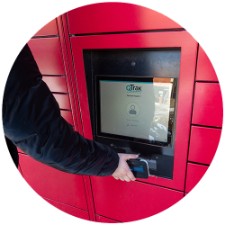 Check the email/text notification for the bank number where your package is located. It will be either “Sacred Heart 1” (bank on the left) or “Sacred Heart 2” (right).
- Locate the locker, go to the kiosk in whichever bank your package is in, tap your SHU ID card, smartphone or smartwatch to the reader and the locker will open.
 Check the email/text notification for the bank number where your package is located. It will be either “Sacred Heart 1” (bank on the left) or “Sacred Heart 2” (right).
Option 2
- Enter the 5-digit pin number from the email/text message. This pin number changes each time and cannot be reused.
Option 3
- Scan the QR code that is in the email/ text message.
Option 4
Download the MyMailServices app from the App Store or Google Play Store.
To activate the application, enter the following information:
- CustomerID: SHU code is 1056
- Email Address: Your @mail.sacredheart.edu email address
- Contact ID/Unique ID Number: this 12-digit Transact ID can be found on the back of your SHU ID at top left.
- After registering, the student will be emailed a one-time six-digit password (OTP); enter that number into the app.
- Enter and confirm your password to login and manage your account.
*Note: this is the only time you will have to sign into the application using these steps. Only the password will be needed for future logins.
We realize that your package is important. Even though you are notified of delivery by Amazon/other carriers once it has been delivered, SHU PAD staff needs additional time to process the package, get it logged into the system and placed on shelves or in lockers.
Our tracking system sends out email and text messages the moment it is routed to you. If you come to SHU PAD before getting a communication from us, we may have the package but have not logged it into the routing system yet. We are committed to getting all packages scanned within 90 minutes of receiving them. If 90 minutes has passed, make your way to SHU PAD during normal business hours and someone will assist you.
Additional Information
- Once a package is routed to a locker from the SHU PAD staff, you will receive an email and app notification saying that your package is ready for pick-up. At this point, you will see the package within your MYMailServices app.
- Make sure the app has notifications turned on and enable notifications in your phone settings.
- Text notifications are also available after confirming your mobile number.
- On the home screen of the app, you will see your available packages.
- Select the package, then select “open locker” and take your package. Do not forget to shut the door when you are finished.
- When using the app, there are two ways to access the locker. One way is through the app. Another is a five-digit pin code that can be entered at the kiosk.
- If notifications are not working, delete and redownload the app.
If you are expecting an oversized package or something that will not fit in a locker, please pick it up at SHU PAD during regular semester hours.
Semester hours for SHU PAD on Park Avenue Campus:
- Monday through Friday: 8:30 a.m.-6 p.m.
- Saturday: 8:30 a.m.-1 p.m.
- Sunday: Closed
There are 308 outdoor lockers contained within two locker banks.
Lockers are monitored for "stale packages,” packages that are not being picked up in a timely manner. If a package does not get picked up within 72 hours, an email will be sent saying that the item has been removed from the locker and is now being stored at SHU PAD. If a package is not picked up after an additional 96 hours, it will be returned to the sender.
The countdown begins the moment a package is put into a locker.
The lockers are monitored by security cameras.
